Tampilkan postingan dengan label multimedia. Tampilkan semua postingan

Kamis, 22 Maret 2012

Download iTunes Player 10.6 Terbaru 2012

iTunes 10.6 (32 Bit)  || File Size : 72.00 MB
--------------------------------------------------------------------------------------
iTunes 10.6 (64 Bit)  || File Size : 74.00 MB 


The version history of iTunes spans from 2001 to the present and covers the application's evolution and refinement from a simple music player to a control center for many types of media. Support for the iPod and iTunes Store (originally the iTunes Music Store) were added in the subsequent versions. Later, other types of media, including radio, films, television shows, and audiobooks were also supported. More recently, iTunes has branched out from the iPod, providing iPhone and iPad syncing capabilities. 


Compatibility

Operating system versions

OldCurrent
Operating system versionLatest versionSupport
Mac OS 9a2.0.4[1] (2002-03-20)2001—2002
Mac OS X v10.01.1.1[2] (2001-05-01)2001
Mac OS X v10.14.7.1 (2005-01-11)2001—2005
Mac OS X v10.26.0.5 (2006-06-29)2002—2006
Mac OS X v10.37.7.1[3] (2008-07-31)2003—2008
Mac OS X v10.4 for G38.2.1[4] (2009-08-28)2005—2009
Mac OS X v10.4 for G4, G5, Intel9.2.1[5] (2010-07-19)2005—2010
Mac OS X v10.510.6[6] (2012-03-07)Since 2007
Mac OS X v10.6Since 2009
Mac OS X v10.7Since 2011
Windows 2000 for x867.3.2 (2007-08-02)2003—2007
Windows XP 64-bit9.1.1[7] (2010-04-27)2003—2010
Windows XP 32-bit10.6[6] (2012-03-07)Since 2003
Windows VistabSince 2007
Windows 7bSince 2009
  • iTunes Store requires at least version 9, dropping support for earlier versions.
  • iTunes on Windows Home Server may cause data corruption, which Microsoft fixed in an update.
  • iTunes usually requires latest service pack or point release to function.
  • a. ^ Mac OS 9.1 is required to burn CDs.
  • b. ^ iTunes supports both 32- and 64-bit editions for Windows Vista and 7.

ScreenShoots:

Selasa, 21 Februari 2012

Free Download Windows Media Player 11

Windows Media Player 11  || File Size : 24.54 MB. 


The latest iteration of Windows Media Player adds a lot of useful bells and whistles, succeeding in many ways as a competitor to iTunes for Windows. A tree-style file directory makes it easy to find the music you want quickly, and a simple search box gets you where you want to go immediately. A five-star rating system lets you rate your music, then organize it by rating, so it's easy to group your favorite songs. Drag-and-drop functionality and a handy Create Playlist button take any confusion out of the process of making your own playlists. Creating the perfect mix CD is equally as easy--simply drag and drop songs into a Burn List in the right panel, then click Start Burn to finish. Ripping was reasonably fast on our test machine, and the program let us pick our preferred bit rate and audio file type.
The biggest new feature in WMP11 is the ability to sign up with paid music and video services. Without registering, we were able to browse various sites and compare prices among services including XM Radio--all from the Windows Media Player interface. We like the new, cleaner look, and the back and forward buttons make it easier to navigate. The ability to sort music by year released makes for some great reminiscing. Overall, we think the latest Windows Media Player offers almost everything you need for every type of media, making it a solid choice for an all-in-one jukebox.


Sabtu, 18 Februari 2012

Free Download Image Magick 6.7.5-6


Image Magick 6.7.5-6 || File Size : 17.54 MB. 


ImageMagick is a collection of tools and libraries designed to read, write, and manipulate an image in many popular image formats, including GIF, JPEG, PNG, PDF, and Photo CD. With ImageMagick, you can create GIFs dynamically, making this program suitable for Web applications. You can also resize, rotate, sharpen, reduce the color of, or add special effects to, an image and save your completed work in the same or a different image format.
What's new in this version: Version 6.7.5-6 includes only set PDF and PS page size when excitedly request.


Jumat, 10 Februari 2012

Free Download Virtual DJ Home Terbaru 2012 v 7.0.5

Virtual DJ Home v 7.0.5 || File Size : 34.91 MB. 


Digital deejaying has skyrocketed in popularity over the past five years and it's no wonder why. Compared to a full vinyl setup with all the hardware and physical media it requires, an MP3-based mixing station is extremely simple and cheap. There's even free software to get you started, and one of the most popular programs available is Virtual DJ.
Virtual DJ is often packaged with USB-based hardware mixing consoles from the likes of Hercules and Numark, and, in fact, if you really want to delve into the full array of features, such devices are going to be a necessity--and they'll require a $99 license fee to upgrade to the Pro version of the software. That said, you can download the app for free by itself and make very basic mixes and playlists.
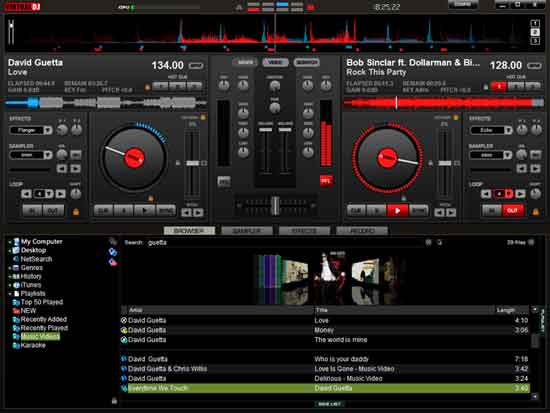
While the program isn't specifically geared at newbies, it is intuitive enough for a musically inclined individual to use right off the bat. Once installed, Virtual DJ automatically populates a folder tree in the bottom left corner where you can easily access your music collection. The bottom middle serves as a tabbed, multifunction area where you can browse tracks, sample music bites, add effects, and make recordings.
The top of the window is dominated by two digital turntables, which are distinguished by color: blue on the left and red on the right. Each one has the ability to cue, loop, adjust pitch, scratch, and shift (among other features). In the middle is the mixing console, where you can adjust the gain and master volume, as well as transition between the two tracks. Once the songs have been dragged and dropped into the console, a bar along the top displays the sound waves of each to help with visual mixing. There's also a video input option that lets you create montages to the music.
The stylish interface and high number of features score points, but learning how to use the program is a hit-or-miss proposition. To be perfectly honest, using it without mixing hardware (that is, just a mouse and keyboard) is a challenge, and not one we enjoyed, so we recommend hooking up a compatible USB controller. Also worth a look: the thorough online user guide.
Virtual DJ is free, fully featured, and well-laid-out. It's a useful option both for aspiring mixers and newbies.


Download K-lite Codec Pack Basic

K-lite Codec Pack Basic || File Size : 7.23 MB. 


K-Lite Codec Pack Basic is a collection of VFW/ACM codecs, DirectShow filters and tools. Codecs and DirectShow filters are needed for encoding and decoding (playing) audio and video formats. The K-Lite Codec Pack is designed as a user-friendly solution for playing all your movie files. With the K-Lite Codec Pack you are able to play all the popular audio and video formats and even several less common formats.
What's new in this version: Version 8.3 includes updated ffdshow to version 1.1.4307, LAV Filters to version 0.45 build 2012-02-06, and Codec Tweak Tool to version 5.1.4.


Kamis, 02 Februari 2012

Download GOM Player Terbaru

GOM Player || File Size : 7.88 MB. 


Not only is GOM Media Player a completely FREE video player, with its built-in support for all the most popular video and audio formats, tons of advanced features, extreme customizability, and the Codec Finder service, GOM Media Player is sure to fulfill all of your playback needs. With millions of users in hundreds of countries, GOM Media Player is one of the world`s most popular video players.


Why use GOM Media Player?

Free!
GOM Media Player is completely free for everyone to download and use.
Comprehensive File Support
GOM Media Player can play all the most popular video formats by default (AVI, MP4, MKV, FLV, WMV, MOV, etc), and
Advanced Features
With a wide variety of advanced features like A-B repeat, screen capture, audio capture, playback speed control, and video effects, GOM Media Player allows you do much more than simply play your videos.
Customization
GOM Media Player’s skinable interface and advanced filter controls make it highly customizable, allowing users to personalize their experience to fit their needs. Download new skins and logos from the GOM Media Player website!
Codec Finder
Some uncommon video types aren’t supported by GOM Media Player by default. When you try to watch these videos, GOM Media Player’s Codec Finder service will search for the one you’re missing and direct you to a place where you can read more and/or download the missing codec.